> For the complete documentation index, see [llms.txt](https://docs.enate.net/whats-new/llms.txt). Markdown versions of documentation pages are available by appending `.md` to page URLs; this page is available as [Markdown](https://docs.enate.net/whats-new/older-versions/changes-overview-older-versions/2023.5-changes-overview/set-confidence-thresholds-for-your-integrations.md).
# Set Confidence Thresholds for your Integrations
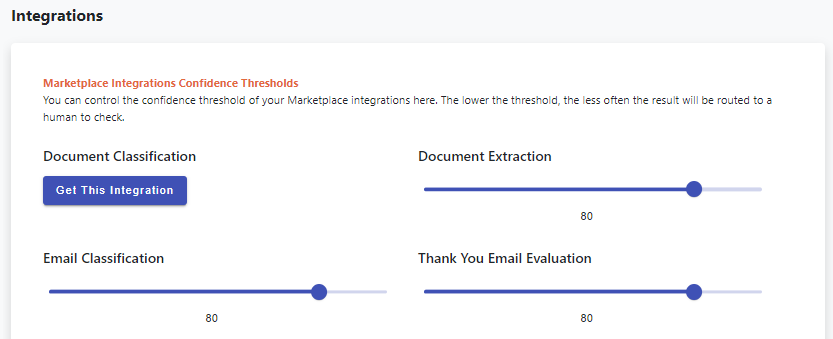
With the introduction of version 2023.5, Builder users will now have the ability to set the **confidence levels** for their Integrations (such as EnateAI's) in the General Settings section. This will give users a greater level of control and flexiility when implementing Integrations into their operations, letting them quickly and easily adjust Integrations confidence levels as needed to allow more of fewer Work Items to be passed via Agents for verification after AI has taken some action.
### How to find the EnateAI confidence level settings
Within Builder, go to the **General Settings** page, then to the **'Integrations'** section.
This section allows users to set the confidence Thresholds for all available Integrations which use them. level for:
* **Document Classification Integrations**
* **Email Classifications Integrations**
* **Document Extraction Integrations**
* **Thank You Email Integrations**
### How to set an integration confidence level
To set the confidence level users simply need to move the slider for the desired integration. The higher the confidence implies a greater degree of trust in the results of the integration, while a lower confidence level will see a greater degree of human involvement.
### What if an integration is not active?
If users do not have a specific integration activated in the Enate Marketplace, there will be a **'Get This Integration'** button displayed instead of the slider. Clicking on this button will take the user to the section of the Enate Marketplace where the Integration offerings for that confidence level option are.
### Integrations that do not have confidence levels
For Integrations that do not work with Confidence Thresholds, no sliders are provided. Examples of this are Sentiment Analysis and Email Data Extraction Integrations.
### Other integration technology providers
These confidence threshold sliders control the threshold levels for ALL Integration patterns, no matter which technology provider has been enabled for it in Marketplace.
---
# Agent Instructions
This documentation is published with GitBook. GitBook is the documentation platform designed so that both humans and AI agents can read, navigate, and reason over technical content effectively. Learn more at gitbook.com.
## Querying This Documentation
If you need additional information that is not directly available in this page, you can query the documentation dynamically by asking a question.
Perform an HTTP GET request on the current page URL with the `ask` query parameter, and the optional `goal` query parameter:
```
GET https://docs.enate.net/whats-new/older-versions/changes-overview-older-versions/2023.5-changes-overview/set-confidence-thresholds-for-your-integrations.md?ask=&goal=
```
`ask` is the immediate question: it should be specific, self-contained, and written in natural language.
`goal` is optional and describes the broader end goal you are ultimately trying to accomplish on behalf of the user. GitBook uses it to tailor the answer towards what is most useful for that goal.
The response will contain a direct answer to the question and relevant excerpts and sources from the documentation.
Use this mechanism when the answer is not explicitly present in the current page, you need clarification or additional context, or you want to retrieve related documentation sections.